Wednesday, 26 July 2017

MIUI 9 Launch Date, Features,Eligible devices & How To Install it

MIUI 9 Launch Date, Features,Eligible devices & How To Install it

Xiaomi has launched the much awaited MIUI 9, which is the latest version of MIUI custom Android. At an event in Beijing, the Chinese smartphone manufacturer displayed the new version of its user interface. MIUI is based on Android Nougat, the new version has the quick app launch time, better resource allocation and other upgrades. Today, on 26th July Xiaomi has launched Mi 5X smartphone in China. The company also displayed it’s MIUI 9 with the new smartphone.  It also unveiled its new Mi AI speaker.
Now, What are the main features of Xiaomi MIUI 9? Xiaomi has shown three main new features of the new OS version. Three main features are Image Search, Smart Assistant and Smart app launcher. MIUI 9 will run out-of-the-box on the Xiaomi Mi 5X, which was launched alongside the new ROM on Wednesday.

MIUI 9 download date and phones

Contents [show]
Xiaomi said that the users can download MIUI 9 from 11th August onwards. The first beta version of Xiaomi MIUI 9, referred to as a developer ROM, this version will be available for download. At present, there is no information given about the Global ROM rollout. The Global ROM and China ROM have slightly different features.

Which Device Eligible for MIUI 9 Updates :

The first batch of the MIUI 9 China ROM will be released for the devices Xiaomi Mi 6, Mi 5X, and Redmi Note 4X(Qualcomm variant).
The second phase of the MIUI 9 China Developer will start from 25th August. It will be for the devices  Xiaomi Mi MIX, Mi Note 2, Mi 5, Mi 5s, Mi 5s Plus, Mi 5c, Mi Max 2, Mi Max, Mi 4S, Mi 4c, Mi Note Pro, and Redmi 4X.

The company says, at last at the end of September, the MIUI 9 will be available for all the other Xiaomi and Redmi mobile phones, except Mi 1/S and Mi 2A.

What Are The MIUI 9 New features

MIUI 9 has lots of new features. The improvements which include faster app, the new designs, shortcuts on the lock screen, split screen features, it functions smartly and much more.

Especially, the Smart app launcher will suggest apps which are based on the things present on the screen. The company Xiaomi has said that some of the features which are mentioned here will only be available in China and that the Global ROM might be a little different.
The latest Operating system also brings three new themes, No Boundary, Colour Fantasy, and, Cool Black and even new default theme. The new features also include a new design on the lock screen. A new shortcut to on the torch is just swiping right on the lock screen. The Split screen feature which was launched with Android 7.0 Nougat which will now be found in MIUI 9 also.
in The Wheel & Win Paytm cashClaim NowMIUI 9 Launch Date, Features,Eligible devices & How To Install 

Sunday, 23 July 2017

Free Ethical Hacking Tutorials: Course for Beginners

Free Ethical Hacking Tutorials: Course for Beginners


Training Summary

An Ethical Hacker exposes vulnerabilities in software to help business owners fix those security holes before a malicious hacker discovers them. In this course, you learn all about Ethical hacking with loads of live hacking examples to make the subject matter clear.

What should I know?


Nothing! This is an absolute beginner guide to Ethical hacking. 

Programming Language , eBook Tutorials 500GB 

Full A to Z Tutorials *New* 👌

http://index-of.es/


ONLY FOR EDUCATIONAL PURPOSE

Friday, 21 July 2017

Reliance Jio Launched World Cheapest 4G Smart Phone

Reliance Jio Launched World Cheapest 4G Smart Phone 

Hello, Readers, this is much-awaited news for all of us, we are expecting the jio new plans and tariffs today, But Mukesh Ambani surprises us by launching new jio smart phone, which is worlds cheapest phone. This Comes to great news for all of us by hearing this from reliance. Mukesh Ambani announced that phone will be free for all users, but you have to deposits Rs.1500 one time where the user can take the money back after 36 months of its usage. They have to submit the used phone and take money back. Really It’s Great Great news by jio. Jio new 4G Smart Phone provides so much featuring So Much Application. Jio Launched Its Cheapest Smart Phone today in presence of Mukesh Ambani. Jio Phone Is revolutionary Phone For Indian, Where It Is Providing Too Much features including 4G Internet, Voice Calls, Smart Text Message, Jio Cinema, Jio Music. Ambani Says Its Digital Freedom For All Indian User. Jio Will Give Unlimted Data Access For Jio Phone. In This Post We Will Describe All The Feature Of Newly Launched 4G Phones.


Jio New Phone Feature Announcement:-

  • Available Pre-Booking From 24 August
  • Will Cost Rs.1500 (Refundable)
  • 2.4 QVGA Inch Display
  • Worlds Cheapest Phone
  • Supported Digital Paymets
  • Advance NFC Support
  • Automatic Updated Software
  • Acess To Jandhan A/C, UPI, Bank, Debit Card / Credit Card
  • Unlimted Calls
  • Jio Music
  • Jio Cinema
  • 4G Internet
  • Alpha Numeric Keypad
  • Four Way Navigation
  • Comapct Design
  • Powerful Battery And Charger
  • Micro Phone And Speaker
  • Headphone Jack
  • Torch And Light

Announcement:-

Reliance Launched new 4G phone At Jio Annual General Meeting, Mukesh Ambani Announced That Jio data consumption has gone from 20 GB crores to 1 crore GB, Jio phone has converted their 100 million free users to paid users claimed Mukesh Ambani.
Thankyou

Wednesday, 26 April 2017

Dual Whatsapp Account On Android – 2017 (Updated)

Dual Whatsapp Account On Android – 2017 (Updated)

Whatsapp is commonly used and a rather popular messenger apps for smartphone device. It is available for almost all mobile platform including Android, IOS, Symbian etc. With the help of whatsapp we can send text, images, Audio, video etc to our friends, relatives. Whatsapp have some limitations link we can’t send few important files like xls, doc and more. In our previous article we also solved this problem which was about send files on whatsapp. Another reason for the popularity of whatsapp is its new feature like whatsapp free calling. You can also check hide images and video from gallery to inclease privacy. Something we accidentally delete phone data. Along with everything, whatsapp database also gets deleted then all the chat, files become inaccessible. So we recommend to read restore deleted messages whatsapp.
Today in this tutorial we are rather going to discuss about using two whatsapp account on same device. Usually we use Android phones which have Dual Sim functionality. But whats app allow you to create only one Account on one Device. We can create two whatsapp account for our both number but we can’t access them at same time on same device. In some condition we use two number like one for profession and second one for family. We want to keep in touch with both whatsapp account. Hence, If you also suffering from this problem then this article is really for you. Today we will explain how to Use dual whatsapp account on single Android device..

How To Run Dual Whatsapp Account On Android.

Method 1:- Dual Whatsapp Account By Using WhatsMapp Solo.

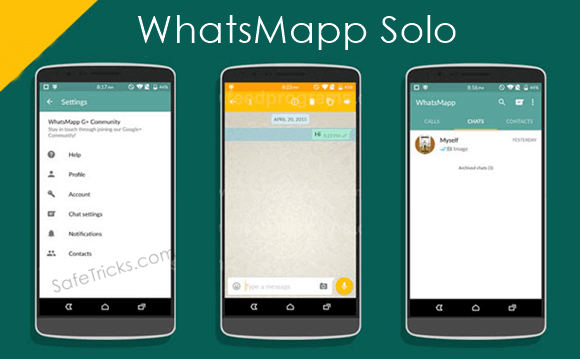
WhatsMapp solo is an Amazing App. By using this App we can Easily create another Whatsapp account on the single Android device. It provide custom icons, Status bar color changing in Lollipop version. Its one of the important feature is it is a antiban App.
Dual Whatsapp account By Using WhatsMapp Solo

Steps To Create Account On WhatsMapp Solo.

1. First you have to download this App and install into your Android phone. you can download it from the button shown below.
Download Button2. Follow the same steps as you follow to make a whatsapp account. Don’t use the same number to create an account.
3. If you face some problem then you should backup and remove the original whatsapp and after that install this App.

Method 2:- Dual Whatsapp By Using OG WhatsApp.

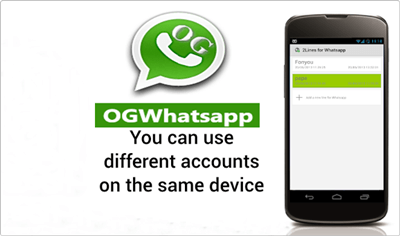
Dual Whatsapp By Using OG WhatsApp

Steps To Create Account On OGWhatsapp.

1. First you have to backup your chats from the Whatsapp settings. You have to go to WhatsApp settings >> chat settings >> Back Up chats.
Dual whatsapp ogwhatsapp chat settings
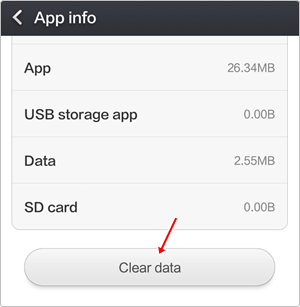
2. Then you have go to your phone settings >> Apps >> whatsapp and click on it and tap the clear data option.
Android app info clear data for dual whatsapp
3. Now go to your whatsapp folder whether it is located on phone storage and SD card and rename it to OGwhatsApp.
4. Uninstall your original whatsapp.
5. Now you have to download this App and then install into your Android phone. You can also download it from the button shown below.
Download Button
6. Create your Account and then, enjoy the trick.
7. Download original whatsapp create/ restore your old account. Hence, you have dual Account.
Note:- In some devices second method may or may not works then we recommend to try first method.
So these are the best possible ways to use two or dual whatsapp account on single android device at same time. In case you find this trick not working or have any trouble don’t forget to share your precious comment.

How To Add Adsense Below Post Title On Blogger

How To Add Adsense In Our Blog or websites

Google Adsense is best online publisher ad network for contextual ads. Google Adsense is best online method to earn from website or blog just by placing ads on them. Adsense offers various type of ads format and size in which they offers text ads, animated flash ads, images based ads in various size in shape of rectangle, square, skyscraper and even Responsive ad units. But for every new blogger or publisher which don’t have good knowledge about ads placement always face problem which showing ads at different positions in their blog.
To earn good revenue from Adsense it is important to place ads at right place where users having more interactions. by choose right ads placement it will boost your earnings. So to places within upper fold of blog, place below post title is always perform better than any another upper fold banners. But to Add Adsense below post title on blogger we always face problem just because their is no option to show ads below post title. If you are also facing problem same issue which ads place then we are sure that this topic is solution of your problem.

How To Put Adsense Below Post Title On Blogger. ?

  • First of Go to Adsense Account and then create new ad unit of size which want otherwise on my recommendation create banner of size 336*280 or 300*250
  • Then select the type of your Adsense code from Asynchronous and Synchronous ad unit and copy your Adsense code into notepad.
  • Now Google HTML Encoder tool to convert your Adsense code for placement within HTML tags.
  • In encoder tool paste your Adsense ad unit and convert your according to your  ad unit type as explained below

Encoding For Asynchronous Code.

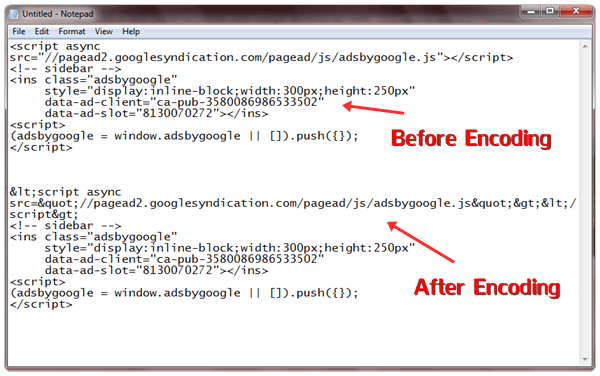
  • If you are using asynchronous ad unit then only convert this portion of your ad unit with encoder tool
<script async src=”//pagead2.googlesyndication.com/pagead/js/adsbygoogle.js”></script>
  • After encoding this code simply replace your old code with encoded then it look likes
encode asynchronous adsense code
  • Never Encode whole asynchronous ad unit it may not works for some template. So only encode in same way as shown above

Encoding For Synchronous Code.

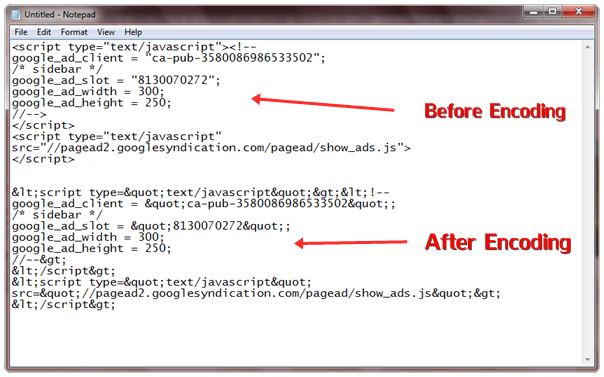
  • If you want to place Adsense ad code of synchronous type then simply code all ad unit code and place it in encoder tool.
  • Then Encode the whole Adsense ad unit and paste it in notepad for further usage. It look like
encode synchronous adsense code

Encoding For Responsive Ad Unit.

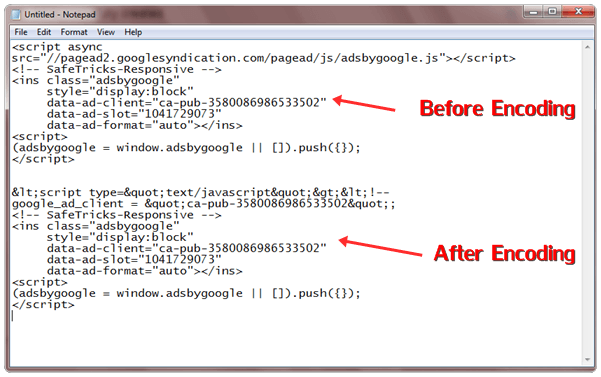
  • Responsive ad unit will encoded in same as done in Asynchronous only encode same portion and replace it with previous once and it will something look like this one.
encode responsive adsense code

How To Add Adsense Code In Blogger ?

  • After doing all process of encoding then you have to place them below your post title to do this process.
  • Open Your Blogger Dashboard >> Template section >> Edit HTML.
  • Then Search for code by CTRL+F which something look like this code.
 <div class=’post-body entry-content’>
  • After finding above code just below it, paste the codes given below. In case if you don’t find above code then search for <data:post.body/> and paste below code just above <data:post.body/>
<b:if cond=’data:blog.pageType == &quot;item&quot;’>
<div align=”center“> Encoded Ad unit code here</div>
</b:if>
  • Replace  Encoded Ad unit code here with the adsense ad unit code which we have encoded above with tool.
  • To change ads position you can change it from center to left or right just by replacing center
  • After doing all these changes save your settings and your Adsense code will works fine.
If you want to change conditional tag to show or hide adsense ads from according to yourself just replace  <b:if cond=’data:blog.pageType == &quot;item&quot;’> with your conditional tag or if you want learn about conditional tags then

How To Detect/Check Unfollowers On Instagram (2 Ways)

How To Check Unfollowers On Instagram. ?

Method 1:- Use Website To Check Who Unfollowed You On Instagram.

There are many websites available that let you check who Unfollowed you on Instagram. You just need to open up those websites. Log in using your Username and password. Give website the permission to check your Instagram account and you are done. Web sites that let you check who Unfollowed you on Instagram are listed below. And they all are free to use.

Crowdfire Website.

There were and still are few websites which can be used to manage your Instagram Account. However, recently due to changes in Instagram API some websites have disabled their service. Unfollowgram and Insta.friendorfollow.com to name a couple of them.
The service which I am going to tell you is still active and works accurately. I have tested it and did the job perfectly. Have a look at the website used and the procedure to use it.
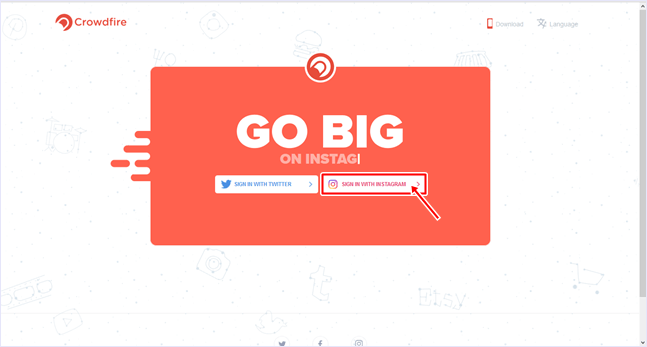
  1. Visit Crowdfire website to check who Unfollowed you on Instagram.
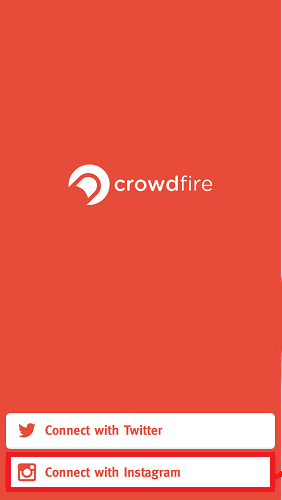
  2. Click on Login With Instagram.
    crowdfire website
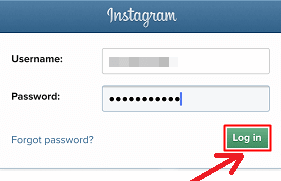
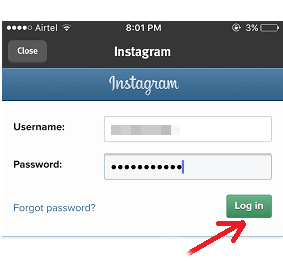
  3. Now you will need to enter your username and password and click Log In.crowdfire web login
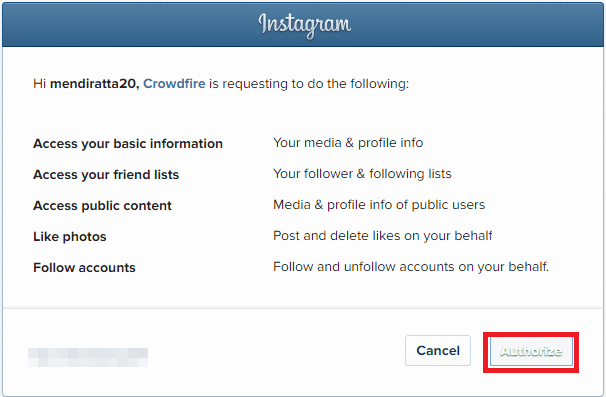
  4. Give access to CrowdFire by clicking on Authorize.
    authorize app
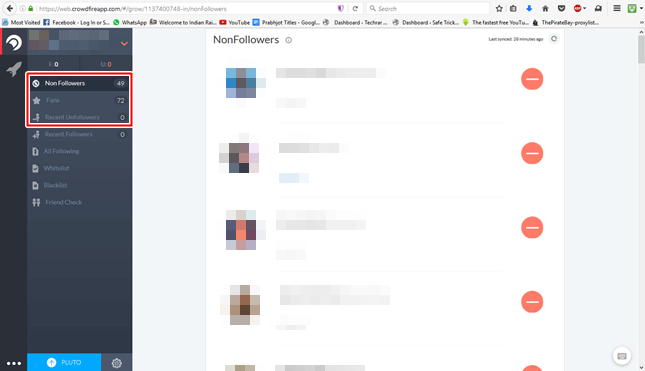
  5. After logging in you can select Non-Followers to see a list of people whom you are following but they are not following you back.
    various tabs
  6. Fans tab will show a list of people who are following you but you are not following them back.
  7. The Recent Unfollowers tab will show a list of people who unfollowed you recently.
  8. How To Detect/Check Unfollowers On Instagram (2 Ways)

     
    0
    How To Check Unfollowers On Instagram
        
    As you all already know that Instagram is a very cool and popular social networking platform. The user can use Instagram either from their website or their smartphone app. Generally, most users use Instagram from the app as it has a very nice and clean interface. In Instagram, a user needs to follow other users in order to see the content they post. On the other hand, the user on opposite side also needs to follow the user to see the content they post. But some people do not follow back which becomes frustrating as your Following count is greater than Followers count. Instagram itself does not let a user to check unfollowers on instagram. We can check see who we are following but followed user is following them or not is not possible. As this was becoming a serious issue, programmers and hackers all over the world got to work and designed various methods to check if someone unfollows you on Instagram.

    How To Check Unfollowers On Instagram. ?

    Method 1:- Use Website To Check Who Unfollowed You On Instagram.

    There are many websites available that let you check who Unfollowed you on Instagram. You just need to open up those websites. Log in using your Username and password. Give website the permission to check your Instagram account and you are done. Web sites that let you check who Unfollowed you on Instagram are listed below. And they all are free to use.

    Crowdfire Website.

    There were and still are few websites which can be used to manage your Instagram Account. However, recently due to changes in Instagram API some websites have disabled their service. Unfollowgram and Insta.friendorfollow.com to name a couple of them.
    The service which I am going to tell you is still active and works accurately. I have tested it and did the job perfectly. Have a look at the website used and the procedure to use it.
    1. Visit Crowdfire website to check who Unfollowed you on Instagram.
    2. Click on Login With Instagram.
      crowdfire website
    3. Now you will need to enter your username and password and click Log In.crowdfire web login
    4. Give access to CrowdFire by clicking on Authorize.
      authorize app
    5. After logging in you can select Non-Followers to see a list of people whom you are following but they are not following you back.
      various tabs
    6. Fans tab will show a list of people who are following you but you are not following them back.
    7. The Recent Unfollowers tab will show a list of people who unfollowed you recently.

    Method 2:- Use App To Check Who Unfollowed You On Instagram

    As most of the users prefer using Mobile devices rather than a computer for social media, hence I assume that this method will be vastly used. Following are the steps to check who unfollowed you on Instagram using apps.

    Crowdfire App

    1. The user needs to download and install App CrowdFire on your smartphone.
    2. Download Crowdfire app for android by clicking on download button below.
      Download From Playstore
    3. Download Crowdfire app for iOS by clicking on download button below.
      Apple appstore button
    4. Open the app and select Connect with Instagram.crowdfire app options
    5. Enter your Username, Password and Click Login.
      crowdfire app
    6. Authorize the app if prompted.
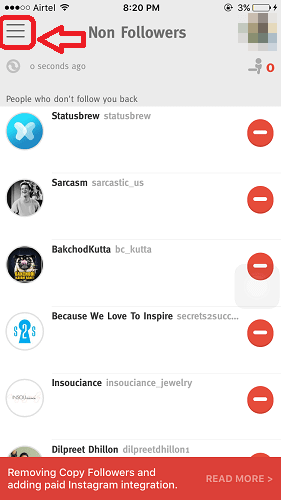
    7. Tap on three horizontal lines at top left corner.
      non followers
    8. Now tap on the desired tab to see the desired list.
    That’s it. Now you guys can easily track your followers.
    In conclusion, we hope you find this guide on how to check Unfollowers on Instagram is helpful to you. If you have any suggestions or queries, feel free to leave a comment below. If you feel like discussing any other tech stuff or have a request for a tutorial, contact us without any hesitation.